Now that I have some significant changes on my new round of mockups and my prototype I wanted to do some quick user testing to see where I stand. I conducted a couple simple tests on UsabilityHub.
#1 Two part Click Test on where users would click to find a product on the store map.
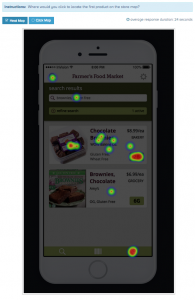
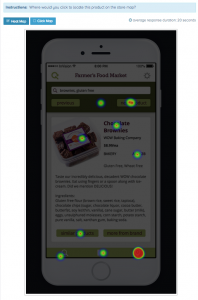
The results showed me that the majority of users were split between the map icon in the footer and the aisle # button, and that they were unable to locate the aisle button unless it looked like a standard light green button. I think I could make the Aisle button stand out more by making it larger and calling it “aisle 2B”.
#2 What is Gather test? Users were told “Imagine you are at a grocery store shopping around for dinner.” and then asked what they thought the app was for while being shown an image of the homepage.
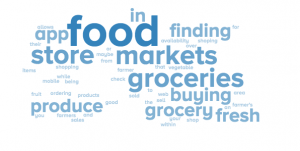
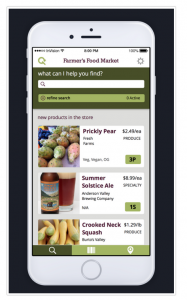
I learned that many users didn’t read the prompt in the beginning, not surprised after teaching high school for so long, lol. In hindsight the prompt would give users too much of a clue so having their responses without it is better in the long run. I found out that the store name at the top of the page was confusing users about what my application did. A few of them thought it had to do with Farmer’s Markets, unfortunately I can’t use a real grocery store’s name so I just put in some placeholder text to clear up any confusion.
You must be logged in to post a comment.